Ticketing Account Tips and FAQs
Mobile NFC Ticketing How-To Guide
Mobile NFC tickets are the safest and most convenient way to receive and manage tickets.
If you still need help accessing and transferring your mobile NFC tickets, contact the box office using the Help button in the bottom left corner or call 860.987.5900.
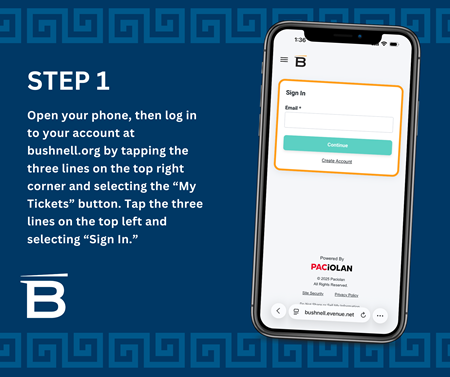
Access your online account
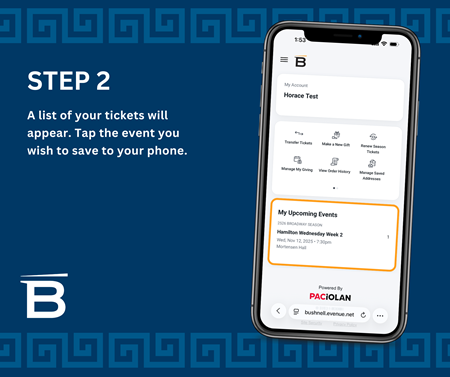
After purchasing tickets, you will receive one email with one link per event. All tickets for the same event will be in one link.
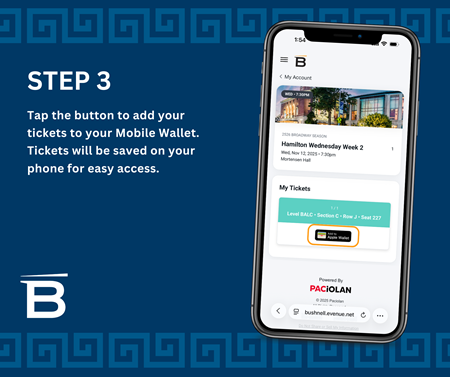
Add your tickets to your phone wallet
We strongly encourage you to download your ticket to your mobile wallet in advance to save you time.
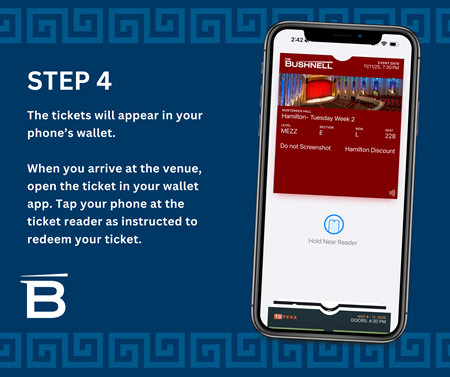
Once you have saved your mobile tickets to your Apple Wallet or Google Pay, open your app and tap on the ticket so it displays on your smartphone. Tap your digital ticket using our new contactless pedestals.
IMPORTANT: Do not screenshot or attempt to print mobile tickets. They are not compatible with our ticket scanners. Mobile tickets must be uploaded to a digital wallet.
How to transfer tickets
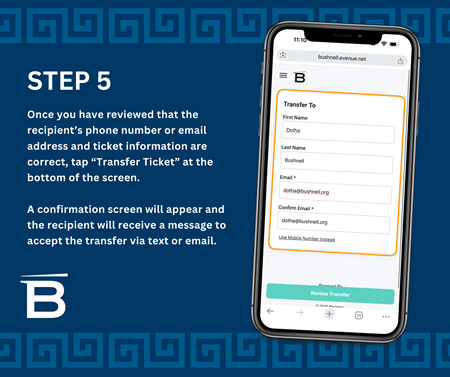
If you are arriving separately from the other members of your group, or if you are gifting tickets, please follow these steps. You can transfer multiple tickets from multiple events, transfer to multiple people, all with the same easy process. Some restrictions may apply to transferring VIP experiences and special add-ons.
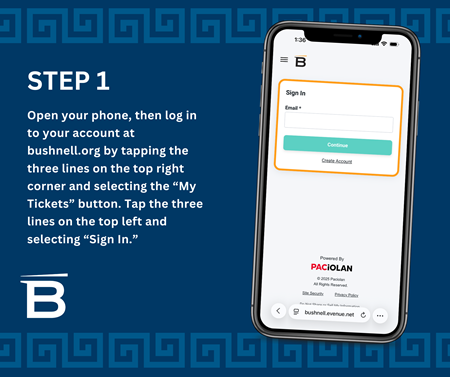
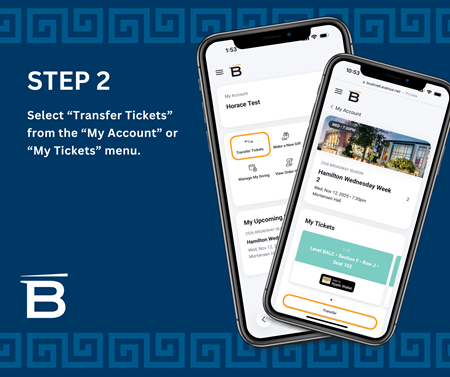
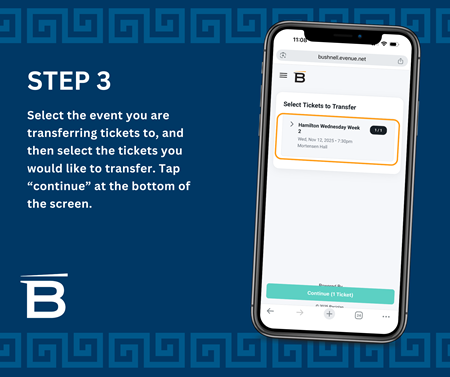
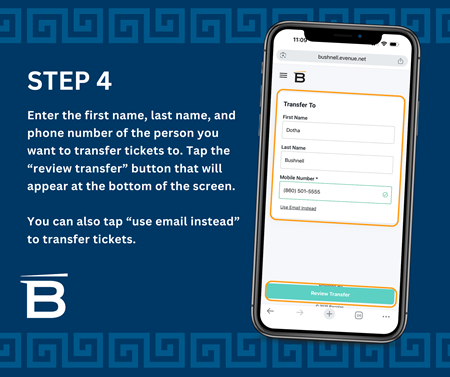
Accepting transeferred tickets
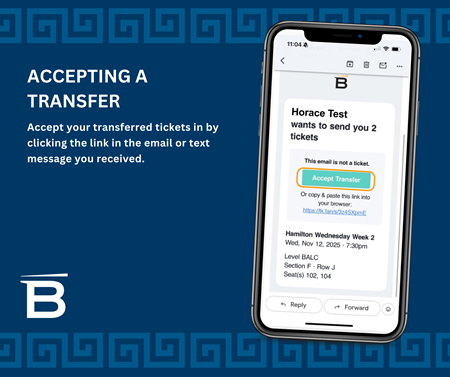
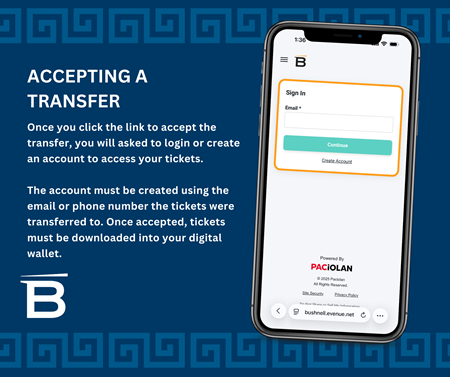
When someone sends a ticket transfer, you’ll receive a text message letting you know you have a pending transfer. If you already have an account, accept the transfer and you will be prompted to log in to retrieve the tickets. If you do not have an account, you will be prompted to create one to complete the transfer and access your tickets.
Benefits of NFC ticketing
-
Never lose your tickets again.
-
Quick and easy contactless entry to the theatre.
-
No need to print your tickets. Simply present your smartphone with tickets.
-
Easily transfer tickets to another patron.
-
Avoid waiting in Will Call lines to pick up your tickets.
-
Prevent your tickets from getting lost in the mail.
Tips
-
Download your tickets prior to arrival at The Bushnell. DO NOT SCREENSHOT YOUR TICKET.
-
Your entire party will need to enter together or transfer each ticket from your account to their phone prior to entry.
-
If you don’t have a wallet capability on your phone, contact the Box Office to have tickets mailed or held at will call.
-
Charge your mobile device before your event to prevent entry delays.
-
Add feedback@bushnell.org to your email 'safe sender' list or mark one of our emails as 'Not junk' so your ticket notification emails don't get sent to your junk folder or blocked by your email provider.
More FAQs
How do I activate my new ticketing account?
- The Bushnell uses the ticketing service, Paciolan. To activate your account, you will be asked to provide an email address.
- A confirmation code will be sent to that email address.
- Once you've entered the code, you will be prompted to create a new password.
- Your account is now activated!
Note: Mobile users, open the activation link in a browser window outside your email app. If you are running into issues activating your account on your mobile device, try activating on a desktop computer or laptop.
Reminder: Your tickets must be downloaded to the digital wallet of your mobile device for entry into the theater.
What is your exchange policy?
- For Broadway Subscription Shows: Subscribers are able to exchange into another subscriber-designated performance of the same title, when allowed. Tickets may not be exchanged into an entirely different title or refunded.
- Single tickets can be exchanged for a $5.00 per ticket fee based on availability. There are no exchanges for non-subscriber/single tickets.
Exchange restrictions apply to transferred tickets. All ticket sales are final.
Can I still Consignback my tickets?
Unfortunately, Consignback is not available with our new ticketing system. We are searching for an alternate solution. Patrons will be notified if a new option for Consignback tickets becomes available.
Can I use a gift card to purchase my tickets?
Yes. If you're having trouble using your gift card online, please contact the box office for assistance at 860.987.5900.
Where can I find more information about Paciolan?
Visit the Paciolan website for further details: https://www.paciolan.com/